
Use this free amortization calculator to see your full loan repayment schedule in seconds. Enter your loan amount, interest rate, and term, and get your monthly payment, total interest, and a year-by-year breakdown of exactly how much of each payment goes toward principal versus interest. Your results update instantly as you type, no “calculate” button needed.
What Is an Amortization Calculator?
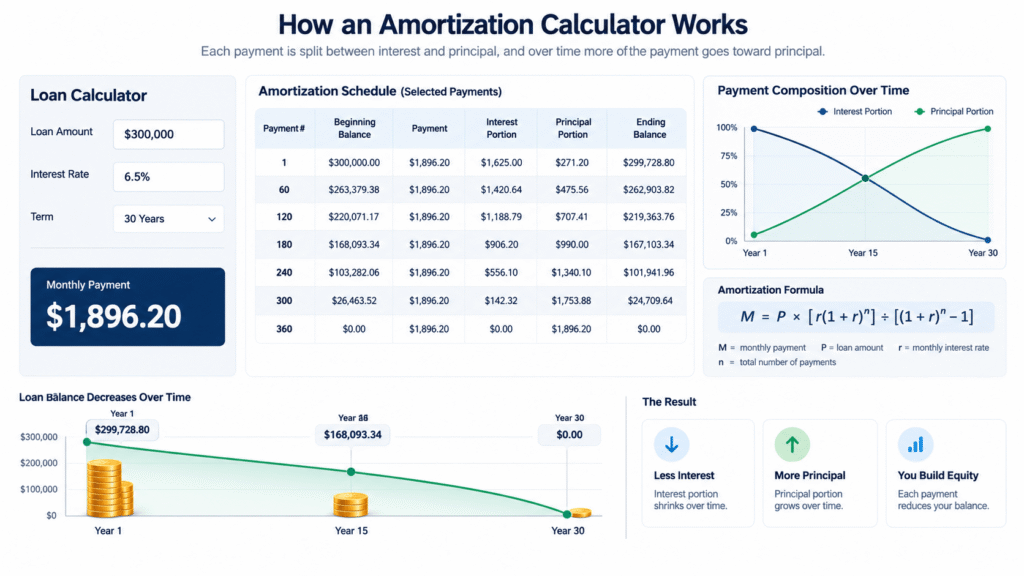
An amortization calculator shows how a fixed-rate loan is repaid over time. With an amortizing loan, every payment you make is split into two parts: one part covers the interest charged on your current balance, and the rest reduces your principal (the amount you originally borrowed).
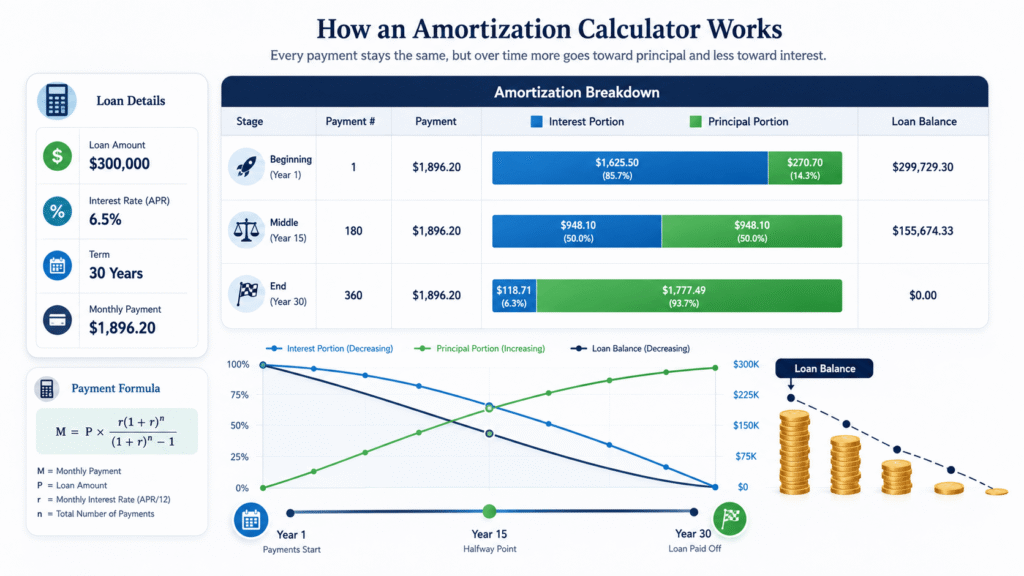
Early in the loan, the interest portion is large, and the principal portion is small. As your balance drops, that flips – your final payments are almost entirely principal. An amortization calculator turns this into a table, called an amortization schedule, so you can see the exact split for every year of your loan and the total interest you’ll pay by the end.
The Amortization Formula
Every amortization schedule is built from one formula:
M = P × [ r(1 + r)ⁿ ] ÷ [ (1 + r)ⁿ − 1 ]
Where:
- M = monthly payment
- P = principal (loan amount)
- r = monthly interest rate (annual rate ÷ 12)
- n = total number of payments (years × 12)
The schedule itself is then just three steps, repeated once per payment:
- Interest = current balance × r
- Principal = payment − interest
- New balance = current balance − principal
Repeat until the balance reaches zero. That’s all a calculator does – the work is simply doing it 360 times without an arithmetic slip.
Example: a $300,000 loan at 6.5% over 30 years gives a monthly payment of $1,896.20. Of the very first payment, $1,625.00 is interest and only $271.20 actually reduces the loan.
How to Use This Amortization Calculator?
- Loan Amount ($): enter the total you’re borrowing.
- Interest Rate (%): enter the annual rate (use the note rate from your loan estimate).
- Loan Term (years): enter the repayment length (15 and 30 are the most common for mortgages).
Your monthly payment, total interest, and total payment refresh automatically as you type, and the schedule below updates with them. Compare a 15-year and a 30-year term side by side to see how much a shorter term saves in interest.
Why Is So Much of Your Early Payment Interest?
Because interest is charged on what you currently owe, and at the start you owe the entire amount. On the $300,000 example above, your first-year payments total $22,754.45 – but only $3,353.18 of that touches the principal. The rest is interest.
This is normal for any amortized loan, and it’s why the crossover point – the moment more of each payment goes to principal than interest – usually arrives more than halfway through the term. It’s also why extra payments early on save so much more than extra payments later.
How Extra Payments Save You Money?
Any extra money you add goes directly to principal, which means future interest is charged on a smaller balance. Small amounts compound into big savings:
- $100 extra per month on a $300,000 loan at 6.5% saves about $61,000 in interest and pays the loan off 4 years sooner (30 → 26 years).
- $200 extra per month saves about $103,000 and pays it off in roughly 23 years.
Even one extra payment per year can shave years off a mortgage. Run your own numbers – the earlier you start, the more each extra dollar saves.
How to Read Your Amortization Schedule?
Each row shows one year of your loan:
- Beginning Balance — what you owe at the start of the year
- Payment — the total you’ll pay that year
- Principal — how much of it reduces your debt
- Interest — how much goes to the lender
- Ending Balance — what you owe after the year’s payments
Watch the Principal column grow and the Interest column shrink as the years pass — that’s amortization in action.
Frequently Asked Questions
What is an amortization schedule?
An amortization schedule is a table that shows every payment on a fixed-rate loan, broken into the portion that goes toward interest and the portion that goes toward principal, plus your remaining balance after each payment. It’s how you see exactly when your loan will be paid off and what it will cost in total interest.
How is my monthly payment calculated?
Your payment depends on three numbers: the amount borrowed, the interest rate, and the number of payments. The standard formula is M = P × [r(1+r)ⁿ] ÷ [(1+r)ⁿ − 1], where P is the principal, r is the monthly interest rate, and n is the number of payments. This calculator applies it instantly and shows the full schedule.
Why is so much of my early payment interest?
Because interest is charged on your current balance, which is highest at the start of the loan. On a 30-year $300,000 loan at 6.5%, your first payment of $1,896.20 includes $1,625.00 in interest and only $271.20 in principal. As your balance falls, more of each payment goes to principal.
How do extra payments help me pay off my loan faster?
Extra payments go directly to principal, so future interest is charged on a smaller balance. An extra $100 a month on a $300,000 6.5% 30-year loan saves about $61,000 in interest and pays the loan off about 4 years early.
Does this calculator include taxes, insurance, or PMI?
No. This amortization calculator shows principal and interest only, which is the standard for amortization schedules. Property taxes, homeowners insurance, and PMI are separate costs you should add on top of the monthly payment shown here.
What types of loans can I use this calculator for?
Any fixed-rate amortized loan: mortgages, auto loans, personal loans, and student loans. It won’t be accurate for variable-rate loans, interest-only loans, or credit-card (revolving) debt, which don’t amortize the same way.
Is amortization the same for a 15-year and 30-year mortgage?
The math is identical – only the term changes. A 15-year mortgage has a higher monthly payment but dramatically less total interest, because the balance is paid down twice as fast.